Open-Source Cold Email Platform: How Himanshu Built an Instantly-Style Outbound System on Notifuse
Learn how Himanshu extended Notifuse into an open-source cold email platform with SMTP rotation, campaign sequences, mailbox warmup, send limits, and safer outbound workflows.

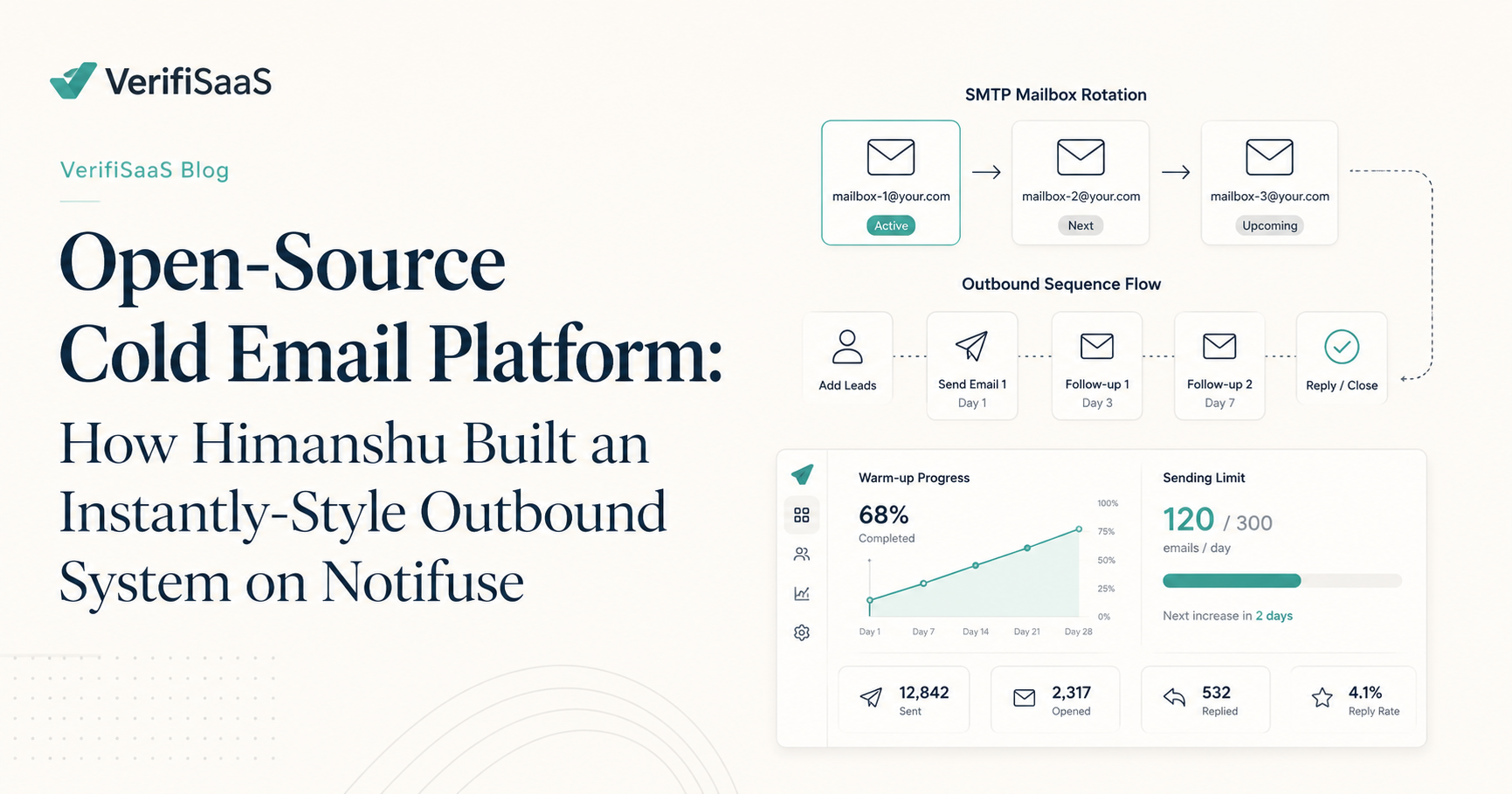
Cold email has become one of the most powerful growth channels for SaaS teams, agencies, recruiters, consultants, and B2B service businesses. But most cold email platforms are expensive, closed-source, and difficult to customise.
Platforms like Instantly popularised the idea of sending cold emails through multiple connected inboxes, rotating mailboxes, warming accounts, controlling daily limits, and building multi-step outbound sequences. That workflow is useful, but for technical teams, agencies, and SaaS builders, one question naturally appears: can this be built as an open-source system that teams can self-host, customise, and connect to their own SMTP infrastructure?
That is exactly the direction Himanshu explored by extending Notifuse into an open-source cold email platform. Instead of using Notifuse only for newsletters, transactional emails, and general email marketing, the idea is to turn it into a practical outbound engine for cold campaigns, SMTP mailbox rotation, controlled sending, and deliverability-safe workflows.
What Is Notifuse?
Notifuse is an open-source emailing platform built with Go and React. It is designed for newsletters, marketing campaigns, transactional emails, templates, analytics, webhooks, and multi-provider sending.
Out of the box, Notifuse already includes useful email infrastructure features such as campaign management, visual email building, contact profiles, list management, Liquid templating, open and click tracking, workspace management, SMTP support, and provider integrations. That makes it a strong foundation for building a cold outreach system.
The missing layer is not basic email sending. The missing layer is cold campaign intelligence. Cold outreach needs more than a normal campaign sender. It needs mailbox-level controls, gradual sending, timing windows, sequence steps, contact enrollment, unsubscribe handling, bounce control, and verification before sending.
Why Cold Email Needs a Different System
A normal email marketing campaign usually sends one message to a large opted-in list. Cold outreach works differently. A cold campaign often sends a controlled series of emails over multiple days.
For example, a simple outbound sequence may send the first cold email on day one, the first follow-up on day three, the second follow-up on day six, and the final follow-up on day ten. This requires a platform that understands timing, delays, contact status, reply detection, mailbox limits, and campaign progress.
If a tool only sends one bulk campaign, it is not enough for serious cold outreach. That is why Himanshu’s Notifuse extension focuses on turning an open-source email platform into a cold campaign engine.
What Himanshu Added on Top of Notifuse
Himanshu’s open-source work focuses on creating an Instantly-style outbound workflow using Notifuse as the base. The goal is simple: let users self-host a cold email platform, connect SMTP mailboxes, rotate sending safely, and run multi-step outbound campaigns without depending fully on expensive closed SaaS tools.
The main feature ideas include cold campaign building, SMTP mailbox rotation, daily send limits, warmup schedules, sending window controls, and contact enrollment workflows.
Cold Campaign Builder
A cold campaign builder allows users to create multi-step outbound sequences. Each step can have its own email template, subject line, delay, and sending rule.
For example, a SaaS founder might create one campaign for agency leads and another campaign for ecommerce founders. Each campaign can have different messaging, different timing, and different mailboxes.
A proper cold campaign builder should allow users to create step-by-step outbound journeys instead of sending one message to everyone at once. This makes cold outreach more controlled, more personal, and easier to monitor.
SMTP Mailbox Rotation
SMTP mailbox rotation is one of the most important features in modern cold email systems. Instead of sending every email from one inbox, the system distributes sending across multiple connected mailboxes.
For example, one campaign may use five mailboxes: [email protected], [email protected], [email protected], [email protected], and [email protected]. If each mailbox sends 30 emails per day, the campaign can send 150 emails per day without forcing one mailbox to carry the full sending load.
A strong mailbox rotation system can support sequential sending, round-robin sending, and domain-spread sending. This helps teams avoid overusing a single inbox and gives more control over outbound volume.
Daily Send Limits
Cold email deliverability depends heavily on controlled sending volume. A new mailbox should not immediately send hundreds of emails per day. That can damage reputation, trigger provider restrictions, and push emails into spam.
Daily send limits solve this problem. For example, a new mailbox may start with 10 emails per day. After warming, it may increase to 30, 50, or more depending on performance and provider rules.
A cold email platform should allow users to set daily caps per mailbox. This protects mailbox health, domain reputation, campaign performance, and long-term deliverability.
Warming Schedule
A warming schedule gradually increases sending volume over time. This is useful when a team connects new mailboxes for outbound campaigns. Instead of sending at full volume from day one, the system can slowly ramp up.
For example, a new mailbox may start with 5 emails per day, then move to 8 emails, then 12 emails, then 16 emails, then 20 emails, and later 30 to 40 emails per day if performance remains healthy.
This creates a safer outbound workflow. A warming schedule can include a starting limit, target limit, ramp-up speed, allowed weekdays, and manual pause controls.
Sending Window Controls
Cold emails should not be sent randomly at any time of the day. A good outbound system should allow sending windows.
For example, a UK-based campaign may send only between 9:00 AM and 5:30 PM from Monday to Friday. A US campaign may send only during business hours in the recipient’s timezone.
Sending window controls make campaigns more natural and easier to manage. They also help teams avoid sending messages outside business hours, weekends, or blocked days.
Contact Enrollment Workflows
A cold email platform also needs a simple way to add contacts into campaigns. Useful enrollment methods include manual paste, CSV import, and contact-list enrollment.
When importing contacts, the system should allow field mapping, duplicate checking, suppression list checking, and validation of required fields. For example, a CSV may contain first name, company name, website, job title, and email address.
The platform should map those fields into the campaign template so users can personalise each message. This allows teams to build more relevant outreach instead of sending generic bulk emails.
Why Email Verification Should Come Before Sending
Before contacts enter a cold campaign, they should be verified. This is where VerifiSaaS fits into the workflow.
Sending cold emails to invalid, fake, disposable, or risky addresses can increase bounce rate and damage sender reputation. A better workflow is to import contacts, verify emails with VerifiSaaS, remove invalid and risky addresses, segment catch-all emails, enroll only clean contacts, and send gradually through warmed mailboxes.
This helps protect domain reputation, mailbox health, campaign performance, and deliverability. A cold email platform without email verification is risky because it may send messages to bad addresses before the sender even realises there is a problem.
Why This Matters for SaaS Teams and Agencies
Many SaaS teams and agencies use cold email to reach founders, business owners, marketers, recruiters, consultants, and B2B buyers. But paid cold email tools can become expensive as campaigns, workspaces, users, and mailboxes increase.
An open-source cold email platform gives technical teams more control. They can self-host the system, customise the workflow, connect their own SMTP providers, manage data internally, and build client-specific outbound processes.
For agencies, this is especially useful. Instead of paying separately for many clients, an agency could host its own outbound platform and manage different client workspaces from one place.
SMTP Provider Options
A cold email platform needs reliable sending infrastructure. Different teams may connect different providers depending on their use case.
Common options include Amazon SES, Google Workspace, Microsoft 365, Mailgun, Postmark, Mailjet, SparkPost, and custom SMTP servers. However, provider limits should always be respected. Just because a provider allows a certain technical sending limit does not mean every cold campaign should use that full limit.
Cold outreach should always use safer, lower, controlled sending volumes.
Amazon SES for Email Sending
Amazon SES is a powerful option for scalable email sending. It is commonly used for transactional emails, product notifications, and high-volume email infrastructure.
AWS SES includes sending quotas, sending rates, domain authentication, bounce handling, and reputation controls. For cold outreach, Amazon SES should be used carefully. Teams should follow AWS rules, verify domains, monitor bounce rates, and avoid sending to low-quality data.
Useful reference: https://docs.aws.amazon.com/ses/latest/dg/manage-sending-quotas.html
Google Workspace and Gmail SMTP
Google Workspace is commonly used in cold outreach because teams can send from real business inboxes. However, Google has strict sending limits and sender guidelines.
A responsible platform should not allow users to abuse Gmail or Google Workspace mailboxes. Users should start with low limits, warm gradually, authenticate domains, keep spam complaints low, and follow Google’s sender requirements.
Useful references: https://knowledge.workspace.google.com/admin/gmail/gmail-sending-limits-in-google-workspace and https://support.google.com/a/answer/81126
Mailpit for Development Testing
Before sending real emails, developers need a safe way to test campaign flows. Mailpit is a useful SMTP testing tool.
It captures outgoing emails locally so developers can test templates, sequences, variables, and sending logic without sending messages to real recipients. This is useful while testing cold campaign steps, SMTP rotation, unsubscribe links, reply-to headers, and schedule logic.
Useful reference: https://mailpit.axllent.org/
Important Deliverability Rules
A cold email system should not be built only for volume. It should be built for controlled, responsible sending.
Teams should verify emails before sending, use SPF, DKIM, and DMARC, include unsubscribe options, respect opt-outs, monitor bounce rates, avoid misleading subject lines, and avoid sending from the main company domain.
Cold outreach works best when it is targeted and relevant. The goal is not to blast thousands of random people. The goal is to reach the right people with a useful message.
Best Architecture for a Notifuse-Based Cold Email Platform
A Notifuse-based cold email system can be structured into several modules.
The campaign module stores campaign details, sending rules, status, and workspace information. The sequence module stores each step, email template, subject line, delay, and stop condition. The mailbox module stores connected SMTP accounts, daily limits, warmup rules, sending windows, and health status.
The enrollment module stores contacts enrolled in campaigns, their current step, last sent time, reply status, and suppression status. The sending scheduler decides which contact is due, which step should be sent, which mailbox is available, whether the sending window is open, and whether the mailbox daily limit has been reached.
The verification layer checks email quality before enrollment using a tool like VerifiSaaS. The analytics layer tracks sent emails, opens, clicks, replies, bounces, unsubscribes, and failed sends. The compliance layer handles unsubscribe links, suppression lists, consent notes, and audit logs.
Why This Is Exciting for Open Source
Open-source email tools already exist, but many focus on newsletters, transactional emails, or marketing automation. Cold outreach has mostly been dominated by closed SaaS platforms.
That creates a gap for developers, agencies, and SaaS teams who want full infrastructure control. Himanshu’s work shows how open-source email infrastructure can move into the outbound sales space.
By building on Notifuse, teams can create a self-hosted cold email platform with campaign sequences, SMTP rotation, sending limits, warmup logic, and custom automation. This is especially useful for teams that want to own their data, customise their workflows, and avoid vendor lock-in.
Where VerifiSaaS Fits In
VerifiSaaS is not a cold email sender. VerifiSaaS is the email intelligence layer that helps teams clean and verify their data before sending.
That matters because even the best cold email system can fail if the list is dirty. A powerful sending engine with a bad list is dangerous. A controlled sending engine with verified contacts is much safer.
Before running any campaign, teams should check whether each email is valid, deliverable, disposable, risky, catch-all, or unsafe to send. This helps reduce bounces, protect sender reputation, and improve deliverability.
Final Thoughts
Himanshu’s Notifuse-based cold email platform idea is an important step toward open-source outbound infrastructure.
By combining Notifuse’s existing email platform with cold campaign features like SMTP rotation, warming schedules, daily send limits, sending windows, and contact enrollment, teams can build an Instantly-style workflow that they control themselves.
But sending is only one part of the system. The real foundation is clean data.
Before any campaign starts, verify your emails, remove risky contacts, and protect your sender reputation. That is where VerifiSaaS fits perfectly.
Clean your list first. Send smarter after.
Useful References
Notifuse GitHub: https://github.com/notifuse/notifuse
Himanshu GitHub: https://github.com/imhimanshu1-stack
Amazon SES sending quotas: https://docs.aws.amazon.com/ses/latest/dg/manage-sending-quotas.html
Google Workspace Gmail sending limits: https://knowledge.workspace.google.com/admin/gmail/gmail-sending-limits-in-google-workspace
Google email sender guidelines: https://support.google.com/a/answer/81126
Google Postmaster Tools: https://www.gmail.com/postmaster/
Mailpit SMTP testing tool: https://mailpit.axllent.org/
VerifiSaaS: https://verifisaas.com/